Learn more

Showing posts with label convert email to pdf. Show all posts

Thursday, June 23, 2022

How to Index Outlook Emails


MailDex logo


Indexing Outlook Emails with MailDex for Windows 11.


How do you preserve and create a searchable index of Microsoft Outlook email content?  Unless you're a certified Exchange server administrator, you may find it difficult to do.  Over the years, its easy for office workers to amass a tens of thousands or more email messages as they change jobs.  Locked in Outlook .pst or .ost files, these messages contain a treasure of personal information, relationships, proof of work quality, and important networking contacts. 

If you have tens of thousands of emails that cannot be searched, then they're just digital junk taking up space on a hard drive. Try MailDex. It's an Outlook .pst viewer, email converter, indexer, and search tool all rolled into one app.

Using MailDex software for Microsoft Windows 11, anyone can create a searchable index that will quickly return important information from your old emails.  And you can continue to add emails to your index, making it a functional, useful extension of your personal work history.

MailDex is project based. You can have as many projects as you want, and each project can contain as many emails as necessary.  You can create or delete any project at any time.  For example, perhaps you want a project that just contains work emails, and another for personal emails, or yet another for a special work activity.

MailDex doesn't just work with Outlook emails. It can import virtually all major email formats into a database.  For example, emails bundled inside an Outlook .pst or .ost file can be imported, as well as individual message files, like .msg or .eml.  You can also bulk import the open .mbox file format that is used by GMail and Thunderbird email clients.

MailDex can also convert your emails into PDF files or other formats for preservation or sharing.

To get started using MailDex, download the free trial from from the Windows App Store, or from the publisher.


Tuesday, May 2, 2017

Convert MBOX Emails to PDF Files

PstViewer Pro is a Windows email viewer for managing different email formats. In PstViewer Pro version 8.0, support has been added for converting email  into nicely formatted PDF files.
Download a free trial of PstViewer Pro and follow along with us.

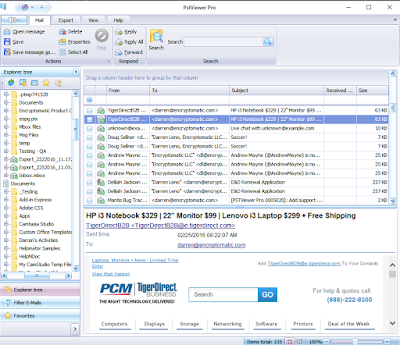
PstViewer Pro mail list with mbox emails displayed.
PstViewer Pro supports MBOX email conversion to PDF


Converting MBOX Emails to PDF

MBOX to PDF export capabilities are a standard capability of PstViewer Pro. You can export an individual emails or all all emails.   PstViewer Pro can also convert most email file attachments into the PDF image.

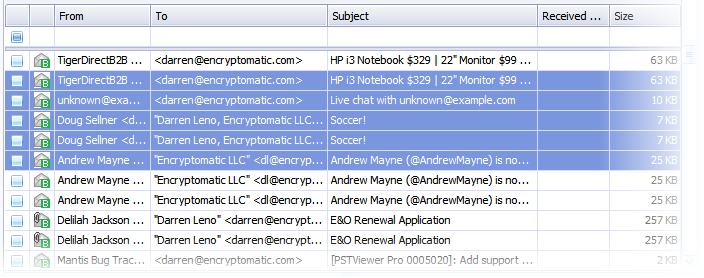
First, select one or more Mbox emails from the maillist. Selected emails are highlighted blue.  To select all emails in the list for PDF conversion, type Control-A.  You can select individual emails individually by holding the Windows control key and click on the specific emails.


Screen shot of emails in a PstViewer Pro mail list, highlighted blue.
Selecting Mbox Emails for Export to PDF

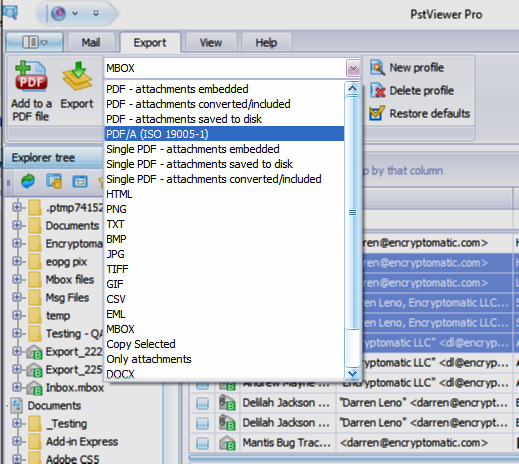
Next, go to the Export tab and decide from the different PDF export options


Screen shot showing selection of the PDF export format from a dropdown list.
Choose the PDF export format on the Export tab
Finally, select the "Export" button.


We hope that you will find PStViewer Pro's MBOX to PDF conversion capabilities a useful feature that saves you time and money.  Please post any questions you have in the comments below, or email supportline at encryptomatic.com.  It is  always good to hear from you!


Thursday, January 14, 2016

Email to PDF: How to Convert Email to PDF Files

The PDF Portable Document Format is an accessible way to share and preserve readable files.  PDF is perfect for e-books, contracts, documents, even for storing photos and drawings. In most instances, to save a document as a PDF file, one only needs to to go the file menu in the app and choose "Save as PDF."

Email client software typically has very limited email export capabilities. Most people who want to convert email to PDF will simply install a free PDF print driver and "print" the email to PDF.  Does this work? Sort of...

When its time to convert e-mail to PDF, especially in bulk, there are a work flow issues you should be aware of. While it is possible to use a standard PDF print driver to print an email message to a PDF document, most PDF software simply doesn't work well for email, because it was not designed for email.  Email will contain embedded graphics and images that can be difficult to render in a PDF document. It will inevitably have file attachments that your PDF print driver software would rather ignore than attempt to deal with. To make matters more difficult, email can be stored in different file formats, including .pst, .ost, .msg, .eml, .mbox, and more; a PDF print driver would require you install a software app capable of rendering each of these different email file formats.

Unless you are dealing with very simple email files, or just a few emails, you will find it difficult to difficult to process email into PDF files using standard PDF converter software.  PDF printer drivers are not well suited for bulk conversion, email with attachments, complex graphics, or documents that must be named a certain way.

PstViewer Pro may be a better choice for your project. PstViewer Pro was built for this purpose, and email-to-PDF conversion is a key part of its work flow.  It has the tools to help you efficiently work with email and pdf files, and is capable of reading virtually any email file format (pst, ost, eml, mbox, msg, winmail.dat, mht) without having additional software installed on your Windows device.

Screen shot of the Export tab in PstViewer Pro email viewer.
Export Email to PDF with PstViewer Pro

How to convert email to PDF with PstViewer Pro

After installing PstViewer Pro and selecting the folder with your email files, the messages will display in the mail list.

Select one or more email that you want to convert to PDF.  Next, from the Export tab, select one of the PDF capable export profiles in the drop down list.

Screen shot showing the different email-to-pdf export profiles in PstViewer Pro.
Select the email-to-PDF export operation that best fits your project.

PstViewer Pro gives you several options for converting email to PDF.

1. Export with email attachments embedded as files within the PDF document, so they can be extracted later.
2. Attempt to convert the documents into the PDF image.  MessageExport can convert many common document and image files into the PDF document.

3. Convert the email to PDF, but extract file attachments to a folder location.
4. Convert email to the ISP 19005-1 PDF/A archiving standard. This format helps ensure accurate rendering of the email.
5. Convert multiple emails into a single large PDF file, with options to embed, extract or convert file attachments.

The email-to-Pdf capabilities that PstViewer Pro provides are a useful part of your email toolbox, and something you wouldn't expect to find in a Windows software package this affordable.


Click here for more information from Encryptomatic LLC about converting email to PDF.

If you have any questions, please post them in the comments below!